Features
Built for the whole set
From the first loop to the last song of the night: every part of Looper Studio, in detail.
Arrangement
Build the song as you play it
Lay out the sections, draw where you record and where it loops, then play straight through. The shape is set. You fill it in live.


01Sections up top
Intro, Verse, Chorus, Outro across the timeline. While you play, it's one row nothing can grab. Open Edit to change it.
02REC and LOOP
A REC clip records you right there. A LOOP clip repeats that take for as long as you draw it.
03Draw a clip
Pick Record or Draw loop in the toolbar, then drag across a track. The new clip snaps to the bars.
Automation
Draw the move once.
Hear it every night.
Shape a volume swell, a filter sweep or a pan move in the automation drawer, right under the song. It plays back the same way every time.

Click, drag, bend
Add a point, drag it into place, then pull the handle to curve the line.
Real units, live
dB, L/R or the effect’s own units as you drag. Or type a value.
Every lane on the track
Each shows its live value and has its own on/off switch.
Locked to the song
Same bars, zoom and snap as the arrangement above it.
Any parameter. Any effect.
Pick what to automate: the track’s volume and pan, or any control of any effect in its chain. Search finds it by name and shows where it lives, like Reverb › Low cut.

Any parameter. Any effect.
Pick what to automate: the track’s volume and pan, or any control of any effect in its chain. Search finds it by name and shows where it lives, like Reverb › Low cut.
Lanes live under the track
Open a track’s lanes in the arrangement and see each move under its clips. EDIT takes that lane to the drawer.


Loop a move
Set an automation clip to loop and the move repeats until the clip ends.
One take, two clips
Clips can share a take. Edit the curve once and both follow.
Master lanes
Automate the Master volume and the effects on the Master chain.
In the export
The exported mix plays every move exactly as you hear it.
Takes & backup
Messed up a loop?
Swap in the backup.


Before the show
Set the backup
Each clip keeps its last 10 takes. Play them back, pick the best one and press Set backup. New passes never push it out.
On stage
A pass goes wrong? Swap it live
Press PANIC in the bottom bar and the loop under the playhead switches to its backup take at once. The transport never stops.
Hands-free
Put it on a footswitch or a key
In MIDI Mappings, pick Panic › Swap to Backup and press Learn. Then step on the pedal, or press the key or pad you want to use.
FS 2orC1Panic › Swap to Backup
While you record
Retry the pass
Flubbed the first bar? RETRY throws the pass away and records again from the top of the clip. The transport never stops.
New in Looper Studio
Play, tune and bring in parts.
No plug-in needed.
Drums and bass are built in, a tuner sits in the bottom bar, and MIDI files drop straight onto a track.

Built-in drums and bass
LS Drums and LS Bass are built in, so a MIDI track makes sound with no plug-in. Play them from a pad controller or the on-screen Play drawer.
- GM drum map
- your own kits

A tuner in the bottom bar
Press TUNE to tune your instrument without leaving the song. The tuner reads the input you play through.
- One press
- any input

Import MIDI files
Drop a MIDI file onto an instrument track to bring in a part you already wrote, then loop and perform over it.
- Drag and drop
- .mid


Effects & plugins
32 effects, built in
Every one ships inside the app, with nothing extra to download or install. They’re ready on any track from the first loop.
Plus your own plugins
AU and VST3 on Mac, VST3 on Windows and Linux, AUv3 on iPad. Up to 8 effects before the fader and 8 after.


Effect chains
Stack effects in seconds.
On every track, bus and the Master.
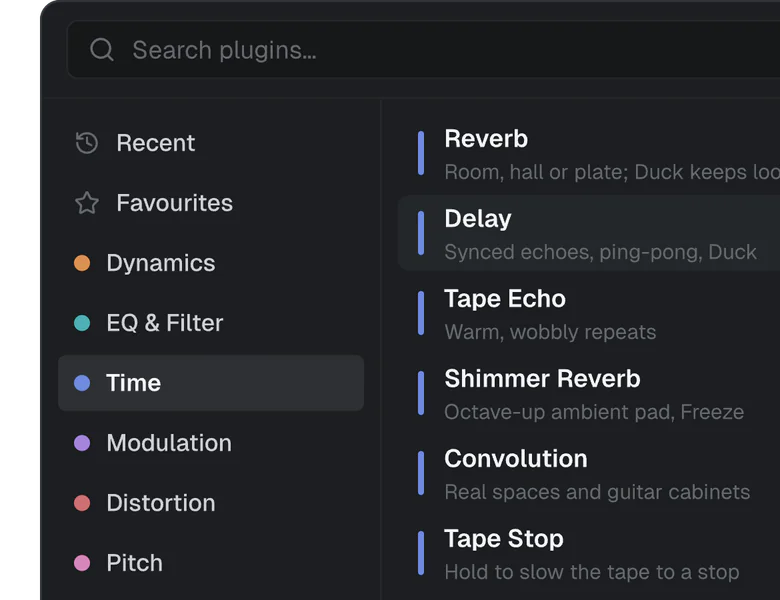
1Add an effect
Search, or browse by type. The 32 built-in effects sit right next to your own plug-ins.
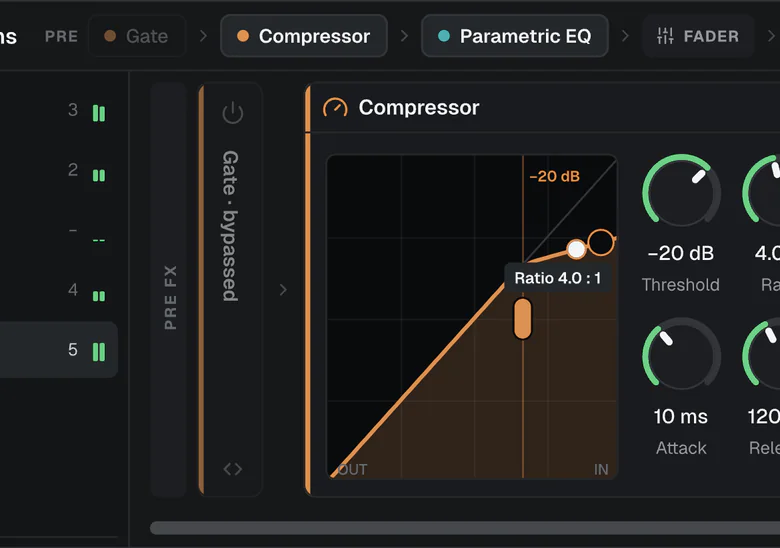
2Drag it into place
Drag a pill in the chain map to reorder. Drag it across the fader to move it pre or post.
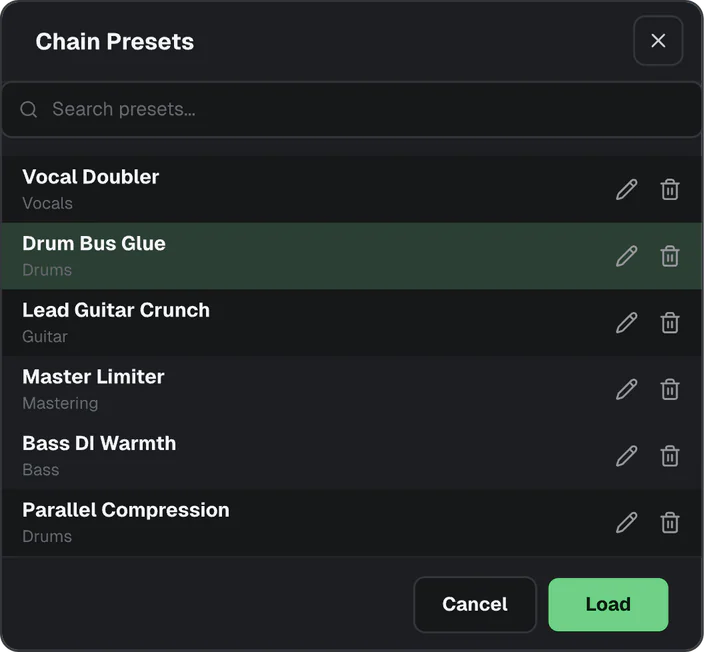
3Save the chain
Save the effects before the fader as a preset and load them on any track. Not sure yet? A/B two versions first.


Sidechain
Effects that hear another track.
Key them from any track or bus.


KickDucker
The bass dips on every kick, so the low end stays clear.
VoxVocoder
Your voice shapes the synth, word for word. No synth? The Vocoder's own carrier plays a pad in the song's key.
Compressor · Gate · Ducker · Auto Filter · Vocoder
and AU / VST3 plug-ins with a sidechain input
Mixer & routing
A channel strip for every track
Every track, bus and the master gets a real fader, an LED meter, its effects and its routing. Click any chip and its editor opens right there.


FX row
One square per effect. Tap the row to open the chain; the power icon bypasses it.
Fader + LED meter
Up to +6 dB, beside a 28-segment meter that holds its peak.
Route
To the master or any bus
Sends
Pre or post, per send
Share one reverb or delay across tracks. Each send has its own level and mute.
Inputs
Up to 8 inputs on one track
Each with its own gain. A stereo pair counts as one.
Direct Out
A separate feed for the in-ears
Buses and the master can send a pre-fader copy, at its own level, to a named output.
Prefer wires? Press N
to see the same routing in the Node Editor.
Node editor
See where the signal goes
Every track, bus and the master is a card on one canvas. Wires show the routing: drag one to re-route a track, or add a send to share a reverb.
Route: where a track's output goes
Send: a copy to a bus, at its own level
Press N to open it.


01Route
Each wire is a track's output. Drag its end onto a bus or the master to re-route it.
02Send
Dashed wires are sends. Click one to set its level, take it pre-fader, mute it or remove it.
03Open a card
Expand any card to see its effects and sends, and add more right there.
Setlist and Perform
Tonight's set, in order
Put the night together in the Setlist view. On stage, Perform keeps the set beside the song: what's on now, and what's next.
01Setlist view
Build the set
Drag songs from your library into the play order, and drag them again to reorder. The set's total length sits at the foot of the list.


01Setlist view
Build the set
Drag songs from your library into the play order, and drag them again to reorder. The set's total length sits at the foot of the list.
Song details
Hear it before you load it
Audition a song without opening it, with its notes, tags and cues right beside it.

02Perform
Tap once to cue.
Tap again to load.
On stage, the sidebar holds the set you picked. Tap a song to mark it NEXT. The current one plays on. Tap it again to load it. A loaded song waits for Play, so nothing starts before you do.


Settings
Your rig, set up once


Latency is measured and compensated. Anti-feedback rings out the room before you play.
Home and cloud sync
Your set, on every device
Every project and its songs live on Home, with the song you last opened one click away. Keep a project in sync and it’s waiting on your other Mac, PC or iPad.
MAC · WINDOWS · LINUX · IPAD


Also in Looper Studio
Hold a moment. Send the set home.

Loop Regions & holds
Vamp over a bar range for as long as you like, then release it with Advance.

MIDI clock out · 24 PPQ · 120.0
Export & MIDI clock
Bounce mixes, stems, or clips to WAV, AIFF, or FLAC. Sync the room over 24 PPQ MIDI clock.
Try it free for 7 days
Your next set
starts here
Download Looper Studio and use every feature free for 7 days. No credit card. Then own it, or subscribe with cloud sync.
macOS · Windows · Linux · iPad coming soon · v1.1.3

