Rec and Loop Clips
How recording works: Rec clips record your playing and keep its takes. Loop clips play a Rec clip again. Draw both with the tools or modifier keys.
Looper Studio has two kinds of clip. Together they explain how recording works.
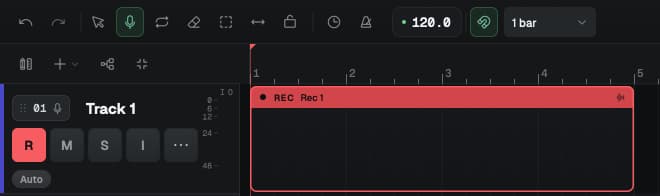
- A Rec clip records. It holds your recording and keeps every pass as a take.
- A Loop clip plays the recording of a Rec clip again, later on the same track. It has no audio of its own.
You record a part once, in a Rec clip. Then you use Loop clips to play it wherever the song needs it.

Rec clips record
Recording happens only inside Rec clips. Before you record, draw a Rec clip where the part goes, as long as you want the part to be.
When you press R (Record), each armed track records inside its Rec clips while the playhead passes through them.
- Where an armed track has no Rec clip, nothing is recorded. The app does not warn you.
- A Rec clip keeps the length you drew. The recording does not make it longer.
- Each pass is a new take. If you record over a Rec clip again, the new pass plays, and the earlier pass stays in the Takes window.
- If a pass does not reach a Rec clip, that clip keeps what it had.
To protect a track's recording from the next pass, turn off its R (arm) button. For the full steps, see Record your first loop.
Loop clips play a Rec clip
A Loop clip plays the recording of one Rec clip on the same track. If the Loop clip is longer than the recording, the recording repeats.
The Loop clip only points at the recording. When you record a new take into the Rec clip, every Loop clip that plays it changes too.
Which Rec clip a Loop clip plays
When you draw a Loop clip, the app connects it to the nearest Rec clip before it on the same track. If no Rec clip starts before it, the app uses the first Rec clip on the track.
To change it, right-click the Loop clip and open Plays, or use SOURCE in the Inspector. You can choose:
- Auto (nearest before): the Loop clip always plays the nearest Rec clip before it, even after you move clips.
- A Rec clip by name and bar, such as Rec 1 · bar 1.
The title of the right-click menu tells you the link. A Loop clip says Loop clip · plays Rec 1. A Rec clip says how many loops play it.
Draw clips
| Tool | Key | Drag on an empty part of a track |
|---|---|---|
| Select / move | 1 | Moves the view |
| Draw rec clip | 2 | Draws a Rec clip |
| Draw loop clip | 3 | Draws a Loop clip |
In the shortcuts list, these tools are Tool: Select, Tool: Record and Tool: Play.
You can also draw with any tool selected:
- ⌘-drag (Ctrl-drag on Windows and Linux) draws a Rec clip.
- ⌥-drag (Alt-drag on Windows and Linux) draws a Loop clip.
After you draw one clip with tool 2 or 3, the tool goes back to Select. Clip edges snap to the grid that you set in the toolbar.
Shared and independent recordings
All the Loop clips that play one Rec clip share its recording. This is on purpose. Re-record the verse guitar once, and every verse changes.
To make one Loop clip different from the others, right-click it and choose Make independent copy. That Loop clip gets its own copy of the recording. It stays in the same place, and new takes on the original Rec clip no longer change it. The item shows only on a Loop clip that plays a Rec clip you chose by name, not on Auto.
When you copy clips:
- A copy of a Rec clip, with Duplicate (⌘D) or copy and paste, is a new Rec clip with its own copy of the audio. Its takes are not copied.
- A copy of a Loop clip made with Duplicate uses Auto (nearest before). If the track has more than one Rec clip, check Plays after you duplicate.
Slide the start of a loop
Press S for the Slide tool. Drag inside a Loop clip to change where in the recording it starts. Hold ⌥ (Alt on Windows and Linux) while you drag to turn off snap. Rec clips do not slide.
MIDI tracks
Rec clips and Loop clips work the same way on MIDI tracks. A Rec clip records notes instead of audio, and its Loop clips play those notes.
Tracks and Clips
Tracks are channels with an input, effects and an output. Clips are the blocks on the timeline. Learn the track header buttons, the track menu and limits.
Takes
Every recording pass on a Rec clip is a take. Go back to an earlier take in the Takes window, keep a backup take for PANIC, and use RETRY while you record.