Projects
A project is a folder that holds songs, setlists and song templates. Home lists your projects. Find where project files live on Mac, Windows and Linux.
A project is a folder for related songs. It holds the songs, the setlists that put those songs in show order, and the songs you mark as templates. Many players make one project for each band, act or show.
Home
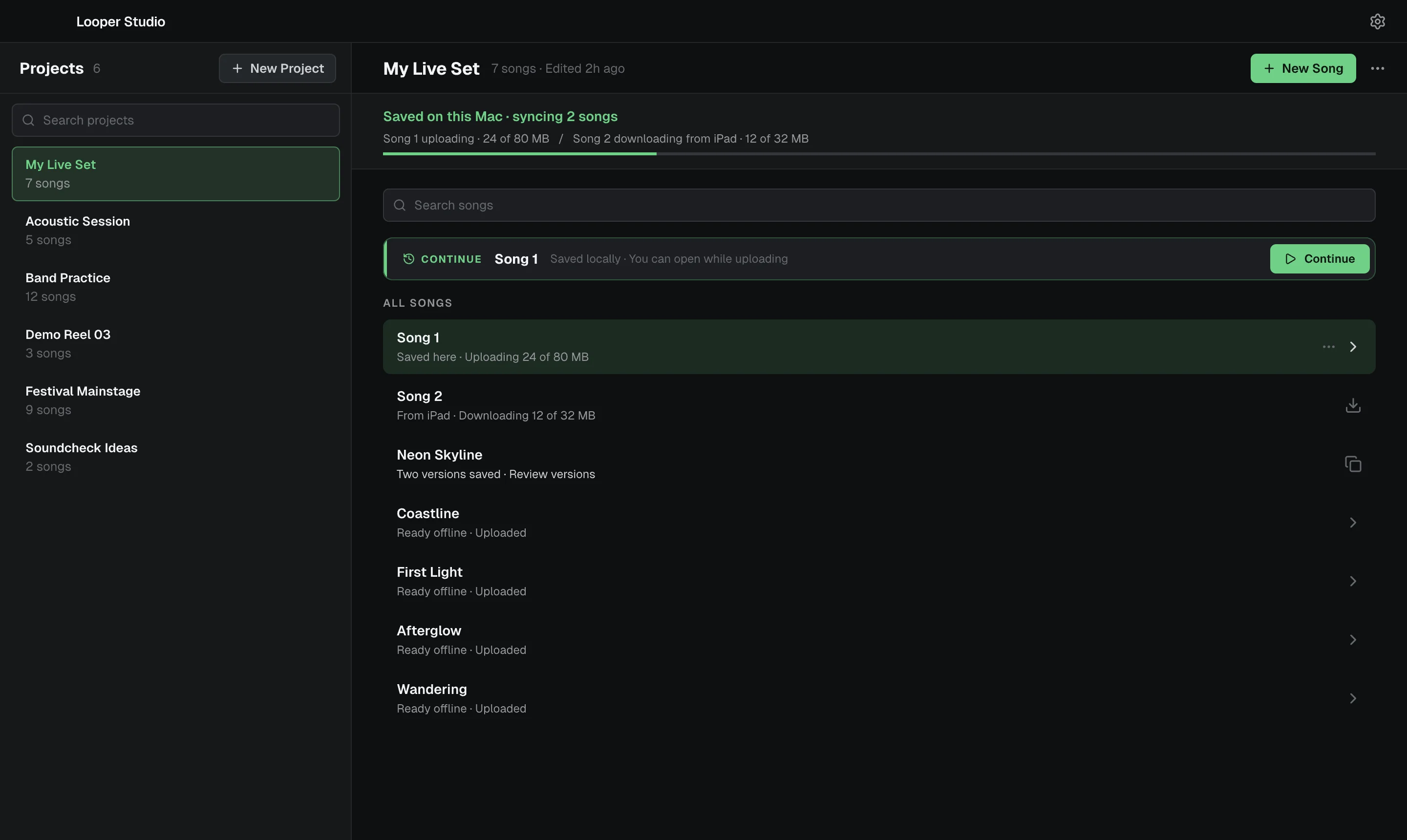
When no song is open, the app shows Home.
- The left side lists your Projects. Use New Project to make one, and Search projects to find one.
- The right side shows the project you select. It has a New Song button, a CONTINUE card that opens the song you used last, and the ALL SONGS list.
- Click a song to open it.
The first time you start the app, Home says Welcome to Looper Studio and offers New Project.
To go back to Home from a song, click the ← arrow at the left of the title bar. Its tooltip is Back to projects. If the song has unsaved changes, the app saves it first.
What a project holds
| Item | What it is |
|---|---|
| Songs | The pieces of music in the project. See Songs. |
| Setlists | The project's songs in show order. A setlist can only list songs from its own project. See Setlists. |
| Song templates | Ordinary songs with a template mark. New songs in the project can start from them. See Project templates. |
Each project row and song row on Home has a ⋯ menu. Use it to rename, duplicate or delete the project or song.
Other ways to open a song
- Songs tab. With a song open, the sidebar's Songs tab lists the songs in the same project. Double-click a song to open it.
- File → Open Recent. This menu lists the songs you used last, one for each project. It works on Home and while a song is open. Clear Recent, at the end of the menu, empties the list.
When you open another song from the Songs tab, Open Recent or a setlist, the app saves the open song first if it has changes.
Where the files live
Each project is a folder under one library folder.
| Platform | Library folder |
|---|---|
| macOS | ~/Documents/Looper Studio/Projects |
| Windows | Documents\Looper Studio\Projects in your user folder |
| Linux | ~/Documents/Looper Studio/Projects |
| iPad (coming soon) | Files → On My iPad → Looper Studio → Projects |
Inside a project, the folders look like this:
Projects/
  Sunset Set/
    Sunset Set.lsproj
    songs/
      Midnight Drive/
        Midnight Drive.lssong
        audio/
      Coastal Lights/
        Coastal Lights.lssong
        audio/
    setlists/
      Friday.lslist
Each song is a folder with its song file and an audio folder for its recordings and takes.
Projects and Cloud Sync
Cloud Sync works one project at a time. You choose Keep in Sync for each project that you want on your other devices. See Cloud Sync.
Concepts
Projects, songs, sections, tracks, clips, takes, automation, routing and setlists. The ideas behind Looper Studio and how they fit together.
Songs
A song holds the tracks, clips, sections and automation for one piece of music. Covers tempo, time signature, key, autosave, save points and templates.